
Doors
Rental Financials
Portfolio Summary
A combined view across every property you've opted into the portfolio — toggle "Portfolio" on a property's own name row to add or remove it here.
No properties are currently included in the portfolio — check "Portfolio" on at least one property's own name row to see a summary here.
Portfolio Verdict
—Scored against the portfolio's own blended figures below — not a stand-in for any single property's own verdict, which stays on that property's own Dashboard tab.
Portfolio Cash Flow
Portfolio Return Metrics
Portfolio Exit & Return
Assumes a sale at the end of the financing term. Illustrative only, not tax advice.
Portfolio Wealth Growth Over the Term
Each property's own figures are as of its own financing term end, which can differ by property.
Portfolio Composition
Each property's own invested capital (down payment + acquisition costs, or the full purchase price if self-financed) as a share of the largest single holding — which property is your portfolio's own biggest bet.
Risk & Return by Property
Cash-on-cash return against DSCR, one dot per property, colored by that property's own Investment Verdict — dashed lines mark the Verdict rubric's own "good" thresholds for each.
Include at least two properties in the portfolio to compare them here.
Portfolio Value & Equity Over Time
Market value, mortgage balance, and total equity, summed across every included property's own trajectory, truncated at the shortest financing term among them — a property's own figures are never extrapolated past its own term end.
Set a valid financing term on at least one included property to see a blended trajectory here.
Combine Properties
Every property currently included in the portfolio, broken out side by side, plus a Total column — the same set of properties as Overview, itemized instead of blended.
No properties are currently included in the portfolio — check "Portfolio" on at least one property's own name row to see it broken out here.
Compare Properties
Key measures side by side across properties included in the comparison. Figures use a fixed monthly/annual basis regardless of each property's own "Show figures as" setting. Use a column's × or a property's own "Compare" toggle to leave it out.
No properties are currently included in the comparison — check "Compare" on at least one property's own name row to add one.
Investment Verdict
—Monthly Cash Flow
Return metrics
Exit & Investment Return
Assumes a sale at the end of the financing term. Illustrative only, not tax advice.
Wealth Growth Over the Term
Revenue to Cash Flow
Vacancy, operating expenses or debt service currently exceed revenue — adjust the drivers above to see the flow diagram.
Sources of Return
Where your total profit comes from over the full financing term, assuming a sale at the end — the bars below sum exactly to Total Profit.
Value & Equity Over the Financing Term
Set a purchase price and amortization above to see the value and equity projection.
Revenue & Expenses Over the Financing Term
Set a purchase price and amortization above to see the revenue and expenses projection.
Cash Flow Timing Over the Financing Term
Set a frequency for at least one cash-flow item in Terms → Cash Flow Modeling to see the timing chart.
Mortgage Payment Over the Financing Term
Set a purchase price and amortization above to see the mortgage payment projection.
Reserves and Accruals
Set an amortization term above to see the CapEx reserve projection.
01Property & Occupancy Type
Structural type drives the default unit count and size below, plus your cap-rate band, CapEx reserve and insurance profile in Terms — every value stays fully editable.
02Utility Metering
Set who pays for each utility. Switching a type to landlord-paid activates its cost field in Terms.
03Other Conditions
01Property
02Financing
03Revenue & Premiums
04Vacancy & Turnover
05Utility Rates
Each rate only applies when its metering type is set to landlord-paid in Conditions — inactive rates are dimmed.
06Operating Expenses
07Cash Flow Modeling
Sets each recurring item's real-world payment cadence — this feeds the Dashboard's "Cash Flow Timing Over the Financing Term" chart only. It never changes NOI, cash flow, cap rate, cash-on-cash, or DSCR, which stay computed on annual totals exactly as before.
08Capital Cost Allowance & Tax
09Exit & Sale Assumptions
Benchmark
Illustrative baseline figures behind the presets — generated live from the app's own building-type data, so it can never drift out of sync with the Terms tab. Download to review or edit in a spreadsheet, then upload to override these defaults for every preset loaded afterward (it won't change a property that's already open). Overriding is reversible. The table below is a data dictionary for that CSV file's columns, not a preview of your current values — download the file to see those.
| Order | Field name | Field values | Sample value |
|---|
Property
Every property currently in your workspace, one row per property. Download to back up or edit in a spreadsheet; uploading a matching file replaces all of your current properties with the ones in the file. The table below is a data dictionary for that CSV file's columns, not a preview of your current properties — download the file to see those.
| Order | Field name | Field values | Sample value |
|---|
Reset
Clear locally-stored data on this device. Each action asks for confirmation first and can’t be undone.
What this tool does
Doors turns a handful of property inputs — purchase price, rent, financing terms — into a full investment picture: monthly cash flow, the return metrics lenders and investors actually check, and how value and equity build over the life of the mortgage. Every default is an illustrative starting figure (see the Terms tab for presets), and every field stays fully editable so you can model your own market and numbers instead of the defaults.
It runs entirely in your browser — no account, no server, nothing you enter leaves your machine. Nothing is saved between visits except your light/dark theme choice, so reloading the page (or reloading a preset) resets a property back to that preset's defaults.
Built for anyone sizing up a rental purchase without a spreadsheet from scratch — a first-time buyer running the numbers on one property, an investor screening several at once, or an agent or mortgage professional walking a client through what a deal actually returns.
What you get
Ten things this tool gives you, out of the box — every one already built and working, not a roadmap.
01A complete investment picture from a handful of inputs
Purchase price, rent, and financing terms alone are enough to generate monthly cash flow, NOI, cap rate, cash-on-cash return, and DSCR — the same measures lenders and investors check before committing capital.
02Market data built into every preset
Eight building types across three location and accessibility tiers, with illustrative baseline price, rent, and property-tax figures already filled in — a fully-populated starting scenario, not a blank form, ready to be adjusted to your own market.
03Every number stays fully editable
A preset is a starting point, not a lock. Every price, rate, rent, and expense field accepts your own figures, and the whole model recalculates the instant you change one.
04See exactly where every dollar goes
A Sankey diagram and a by-line-item bar list trace revenue down through vacancy, operating expenses, and debt service to what's actually left in cash flow.
05Term-long projections, not a single-year snapshot
Value, mortgage balance, equity, and cash flow are projected year by year across the full financing term, with zoomable charts and a stats panel for each one.
06Illustrative tax modeling
Declining-balance depreciation (4% default), a remaining depreciable basis, and the half-year rule feed directly into the after-tax cash flow figure — the same mechanics many tax systems use for rental property depreciation.
07Refinance modeling included
Add up to two cash-out refinances at any point in the term and see the effect ripple through debt service, cash flow, and equity for every year that follows.
08Model up to five properties side by side
Each property keeps its own inputs, Dashboard, and projections — add a new one in a single click without losing any other property's numbers.
09A Compare table and blended Portfolio summary
Purchase price, cash flow, cap rate, cash-on-cash, DSCR, and equity multiple for every property in one table, plus a Portfolio view that blends opted-in properties into one set of totals.
10Runs entirely in your browser, installable on your phone
No account, no server, nothing you enter ever leaves your device — and it installs as an app on Android home screens for full-screen, offline use.
See it in action
Real screenshots of the running app — not mockups. See the full walkthrough on the How-to tab.
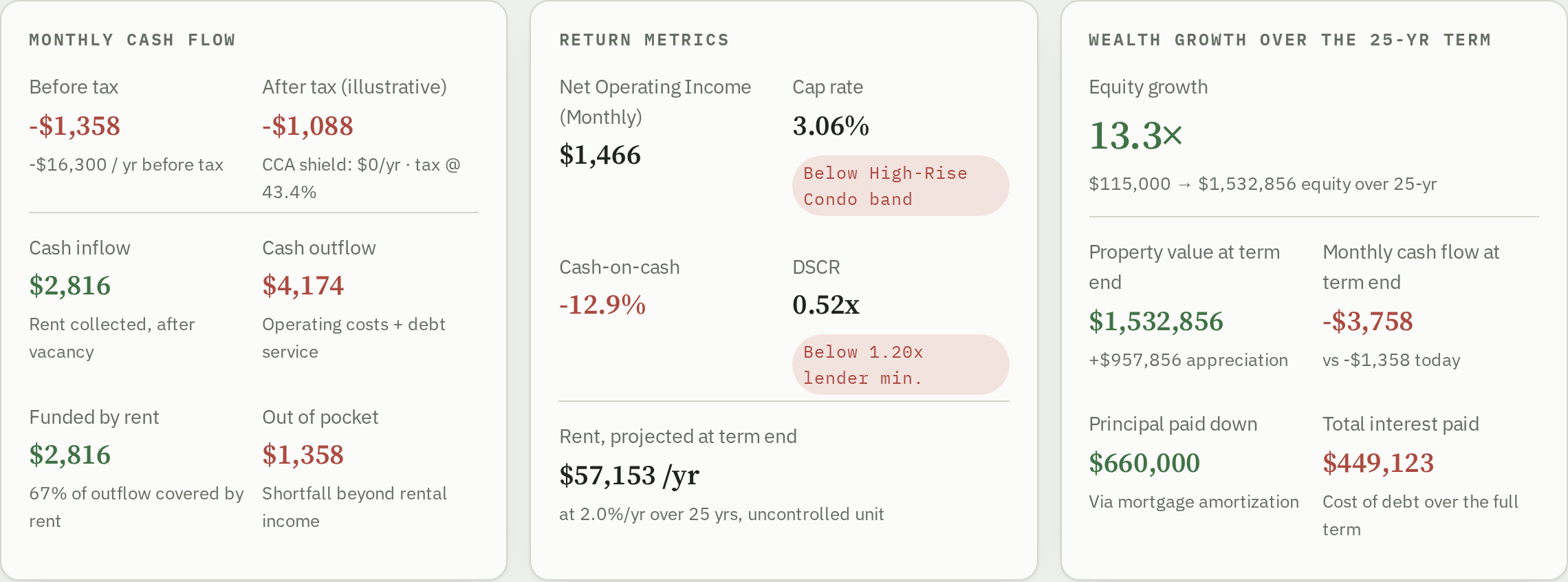
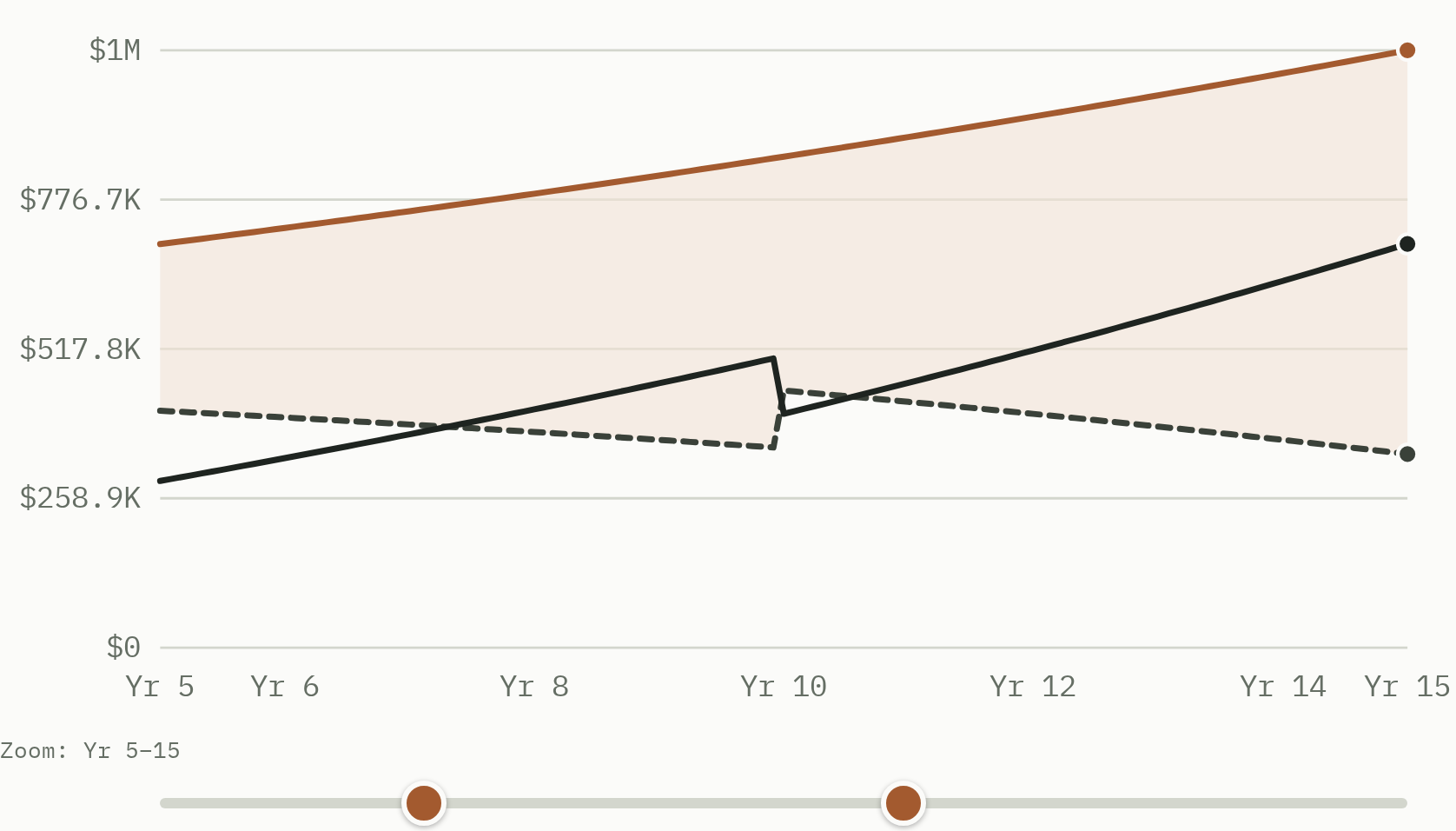
Ready to try it? Open the How-to tab in the header for a full step-by-step walkthrough, or jump straight into Property 1's Dashboard and start editing numbers — nothing here is destructive, and ↻ Reload preset always gets you back to a clean starting point.
Glossary
Plain-language definitions for the measures and mechanics this tool uses, grouped the way you'll actually encounter them — not an exhaustive real-estate dictionary, just the terms this app itself surfaces.
Income & occupancy
- GPR — Gross Potential Rent
- Total annual rent if every unit were occupied all year at full asking rent, plus add-on income (parking, storage, laundry, other).
- EGI — Effective Gross Income
- GPR minus vacancy and credit loss — what the property actually collects in a typical year.
- Location premium / transit premium
- Percentage adjustments to base rent for neighbourhood desirability and transit proximity — the preset dropdown's Accessibility tier (Premium/Standard/Car Access Only) sets this same field.
- Leasing friction
- The amortized cost of finding a new tenant (e.g. a realtor's fee of one month's rent), spread over the average tenancy length so a one-time cost reads as a recurring expense.
Return measures
- NOI — Net Operating Income
- EGI minus operating expenses, before debt service — the standard measure of a property's income-producing power, independent of financing.
- Cap rate
- NOI ÷ purchase price. The unleveraged annual return if the property were bought entirely in cash.
- Cash-on-cash return
- Cash flow before tax ÷ invested capital. The annual cash return on the money actually put in.
- DSCR — Debt Service Coverage Ratio
- NOI ÷ annual debt service. Lenders typically want at least 1.20x.
Financing
- Cash flow before tax
- NOI minus annual debt service — what's left after paying the mortgage, before any tax effect.
- Amortization schedule
- How a fixed-rate loan's balance declines over its term as level payments are made — mostly interest early on, mostly principal later.
- Self-financed (all cash)
- Buying without a mortgage — no down payment percentage, no debt service until (and unless) a refinance is taken out later.
- Cash-out refinance
- A new loan against a property already owned, starting at a chosen year and amortized over the years remaining in the term. Up to two can run at once.
Tax (illustrative)
- Depreciation (CCA in Canada)
- A non-cash deduction against rental income for the building's wear (not the land), reducing taxable income without an actual cash outlay. This model uses a 4% declining-balance rate by default, editable in Terms.
- Depreciable basis (UCC in Canada)
- The building's remaining tax basis that the depreciation rate is calculated against.
- Building value share
- The percentage of the purchase price allocated to the building versus the land — only the building portion is eligible for depreciation.
- Half-year rule
- A common tax-system rule limiting the depreciation claim in the year an asset is acquired to 50% of a full year's claim.
- Vacant Home Tax
- A tax some municipalities levy on units left vacant 184+ days in a year, as a percentage of assessed value. Off by default — only relevant where such a bylaw exists.
Charts & projections
- Equity
- Market value minus mortgage balance at a point in time — the portion of the property owned free of debt.
- Equity multiple
- End-of-term equity ÷ start equity — how many times over your starting equity has grown.
- CapEx reserve
- Money set aside monthly for big-ticket replacements (roof, furnace, etc.), spent on a recurring replacement cycle.
- Cash inflow / cash outflow
- The two directional halves of net cash flow: inflow is effective revenue after vacancy, outflow is total costs plus debt service. Net cash flow is always inflow minus outflow.
How the Numbers Flow
The calculation runs in one direction, stage by stage — each stage matches a section of the Dashboard's flow diagram. Knowing this order makes it easy to trace any figure on the Dashboard back to the input that drives it.
- Revenue — base rent plus location/transit premiums and add-on income, totalled into Gross Potential Rent (GPR).
- Vacancy — GPR minus vacancy & credit loss leaves Effective Gross Income (EGI).
- Operating expenses — property tax, insurance, HOA, management, CapEx reserve, leasing friction and more, subtracted from EGI to leave Net Operating Income (NOI).
- Debt service — the mortgage payment(s), including any active refinance, subtracted from NOI to leave Cash Flow Before Tax.
- Depreciation & tax — an illustrative depreciation deduction and marginal tax rate applied to estimate After-Tax Cash Flow.
- Over the term — the same drivers projected year by year to show property value, mortgage balance, equity and cash flow evolving across the full financing term.
Version History
Every release, newest first — what's new and when it shipped. A new entry is added only at the point the app is actually submitted to the Play Store or App Store, not for every change in between.
Initial release
The first public release — everything on the Features sub-tab, submitted to the Google Play Store and Apple App Store.
How to use this tool
Nine short walkthroughs, roughly in the order you'd work through them for a new property. Glossary and How the Numbers Flow have moved to their own sub-tabs under About; market benchmark figures live on their own Data tab. Each walkthrough below is collapsed by default — click a heading to expand it.
01Getting started
- Open
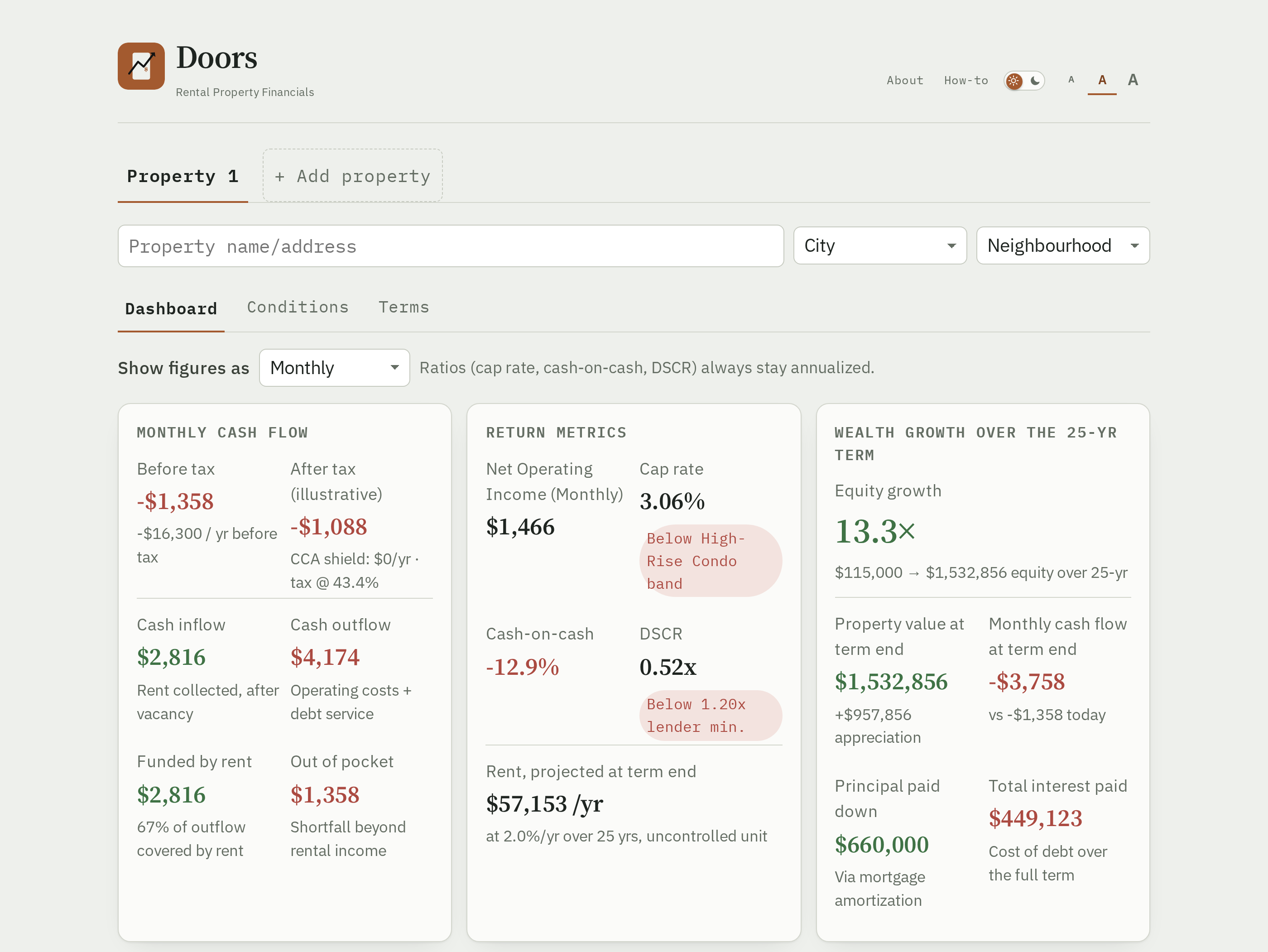
index.htmldirectly in any modern browser — nothing to install, no server, no internet connection needed after the page loads (Google Fonts is the only external request). - The top tab row holds your properties on the left (starting with Property 1). About, Properties, Settings, Data, and this How-to tab live above it, in the header's own row; the theme switch, text size buttons, and Profile icon sit on the row above that, next to the logo — all of it the same regardless of how many properties you've added, since it documents the tool itself rather than any one property's numbers.
- The page opens on the first property's Dashboard sub-tab, showing whatever scenario loaded by default. Each property has its own Dashboard, Conditions and Terms sub-tabs.
02Load a preset scenario
- Enter a City next to the Property name/address field first — it's a label for your own reference; presets load at an illustrative baseline you then adjust to match your own market's price, rent and property tax.
- Open the Terms tab. The Preset scenario dropdown is grouped by property type, then by location and accessibility tier within each type.
- Click ↻ Reload preset at any time to snap every field back to that preset's illustrative defaults, discarding any edits you've made since.

03Set property conditions
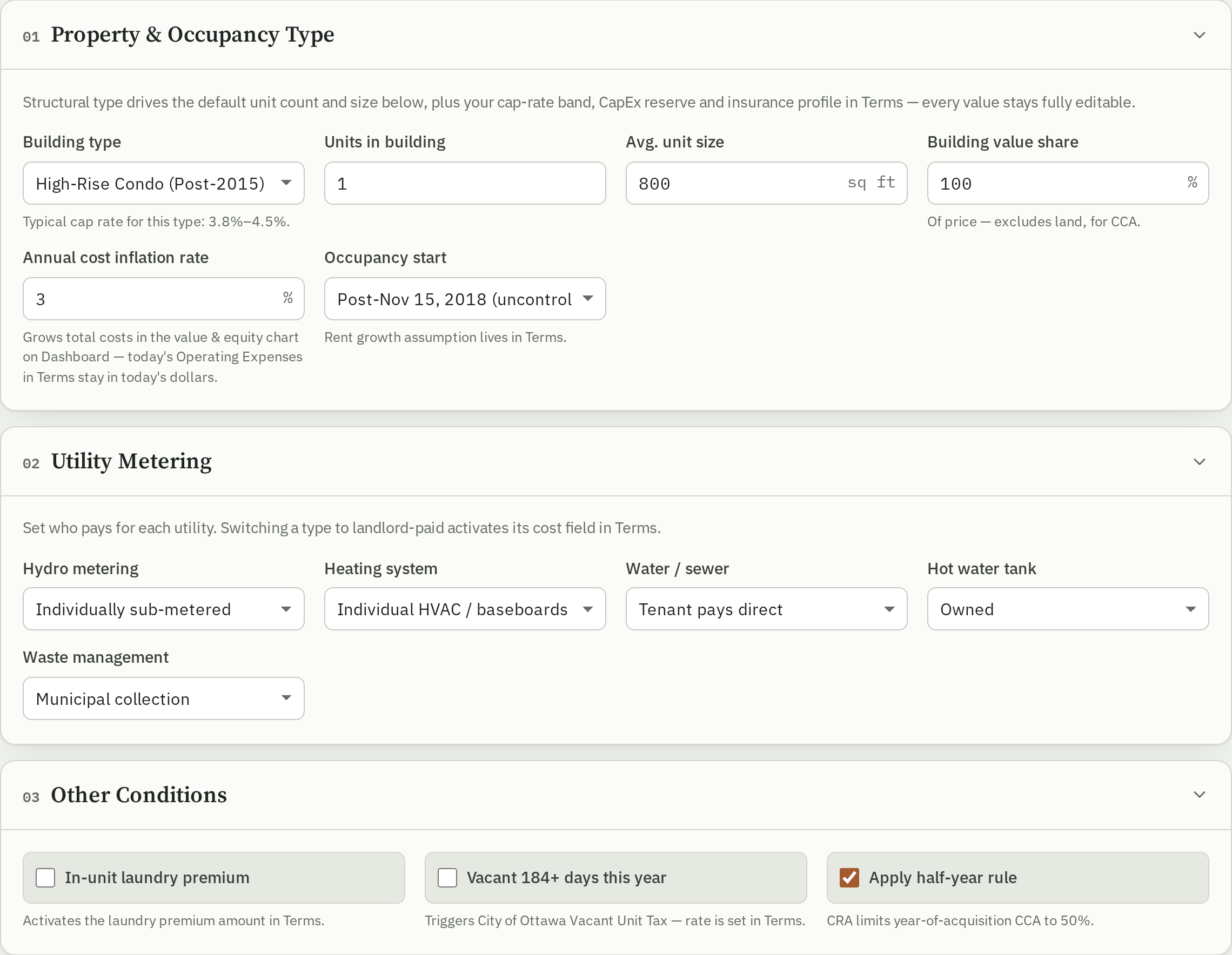
- Open the Conditions tab.
- Pick a Building type — this sets sensible defaults for cap rate band, CapEx reserve, HOA and insurance over on the Terms tab (still fully editable there).
- Set utility metering (who pays hydro/water/gas) and any other categorical conditions — the half-year rule and so on.
04Fine-tune financing & revenue details
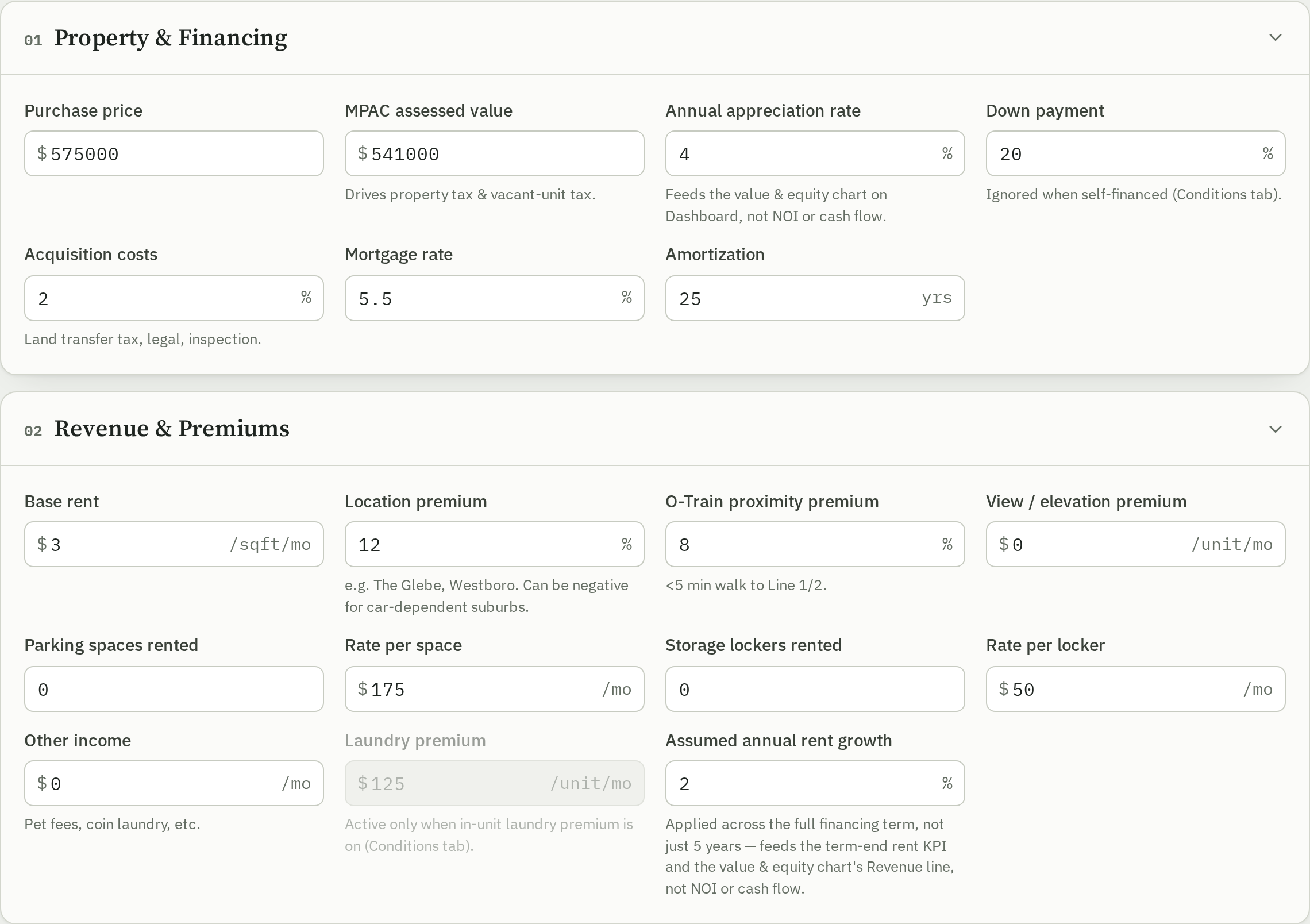
- Open the Terms tab and expand any of its eight sections: Property, Financing (financing method and up to two refinances), Revenue & Premiums, Vacancy & Turnover, Utility Rates, Operating Expenses, Cash Flow Modeling, and Capital Cost Allowance & Tax.
- Every numeric field is editable directly — type a new value and the whole model recalculates immediately.
- Some fields appear dimmed and disabled depending on another setting (e.g. down payment while self-financed) — the hint text under a greyed-out field names which control it.
05Read the Dashboard
- The three KPI cards at the top read left to right as a narrative: what the property makes today (Monthly Cash Flow), how good a deal that is (Return metrics), and what it builds over the full term (Wealth Growth).
- The Revenue to Cash Flow card below shows the same numbers two ways: a flow diagram (Sankey) and a by-line-item bar list.
- Five charts further down project market value, equity, revenue & expenses (a stacked area for every individual line item), cash flow, mortgage payment, and the CapEx reserve across the full financing term — use the checkboxes above each chart to show or hide individual lines.
06Change the time period shown
- On the Dashboard, use the Show figures as dropdown to rescale every dollar figure — Bi-Weekly, Monthly, a number of years, and so on.
- Cap rate, cash-on-cash and DSCR never rescale — they're ratios, always shown annualized regardless of this setting.

07Zoom into a chart
- Each of the three term-projection charts has its own dual-handle slider directly below it.
- Drag either handle to crop the chart to a sub-window of the financing term (e.g. years 5–10) — both axes rescale to that window automatically.
- Drag the handles back out to the full span to zoom back out — there's no separate reset button.
08Add and compare multiple properties
- Click + Add property in the tab bar (up to 5 properties at once).
- Give each property a name in the field above its Dashboard/Conditions/Terms sub-tabs — it updates that property's own tab label immediately.
- The Portfolio tab, pinned first in that same row, always has its own Compare sub-tab (alongside Overview and Combine) — reachable with just one property, no need to wait for a second. It shows every property's key measures side by side, on a fixed monthly/annual basis regardless of each property's own period selector, and a column's × drops that property from the comparison directly.

09Switch between light and dark theme
- Click the switch on the header's top row, next to the logo and left of the text-size buttons and Profile icon, to toggle between light and dark — both a sun and a moon are always shown, and the slider sits over whichever one is currently active.
- Your choice is saved in the browser and wins over your system's light/dark setting from then on.
- Before your first click, the page follows your operating system's setting automatically, including live changes to it.

Show or hide parts of the app
Every card, chart, and driver section below is visible by default. Turn any of them off to trim the app down to just what you use — a hidden section keeps whatever value it currently has and still feeds every calculation, it's just out of view. Applies across every property you've added, and your choices are saved in this browser for next time.